



























Industrial Quick Change Discs for Fast-Lock Grinding and Finishing

Built for die grinders, pneumatic tools, and right-angle surface prep sanders, quick change discs let operators swap abrasives in seconds without a wrench. They speed up weld grinding, deburring, edge blending, and surface prep. While surface conditioning refers to non-woven abrasive grades, quick change defines the mechanical fastening style used across ceramic, zirconia, aluminum oxide, and non-woven disc types.
Quick change discs come in three attachment systems, and they are not interchangeable. Each one uses a different threading design on the back of the disc. Benchmark Abrasives stocks Type R only. Type R is the Roloc™-compatible system used by about 90% of quick change users.
- Type R (Type III): Introduced by 3M as Roloc™ ("roll-on, roll-off"). It also goes by TR, TIII, roll-on, quick-lock and twist-lock. A threaded plastic button on the back of the disc twists into a Type R holder. Every Benchmark quick change disc uses this system.
- Type S (Type II): Trademarked by Standard Abrasives as "turn-on, turn-off." Its threading is different, so it won't fit a Type R holder. It's mostly used in industrial settings and is hard to find. Benchmark doesn't carry it.
- Type P (Type I): The original quick change design. It's no longer sold.
If your current discs or holder say Roloc, TR, Type R or Type III, they will work with Benchmark discs and mandrels. Then match the disc diameter to your holder. The sections below cover abrasive selection, tool speed and holder care.
Attachment Systems Explained
Many fabricators use "Roloc" as shorthand for any quick change disc. Strictly speaking, Roloc™ is 3M's trademarked name for Type R, the system Benchmark sells. When you order, make sure the disc and holder use the same attachment type and the same diameter. For equipment that fits these disc types, see our guide to the best quick change disc machines.
Type R (Type III, Roloc™-Compatible)
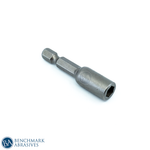
Type R discs have a threaded plastic button that twists into a female Type R rubber holder. It's the most common quick change system for blending, grinding, deburring and finishing. TR, TIII, roll-on, quick-lock and twist-lock are all names for this one system, not separate ones. Every 2" Benchmark quick change disc fits our 2" quick change mandrel. Every 3" disc fits our 3" quick change mandrel. Each one also fits any other Roloc™, Type R or Type III holder of the same diameter.
Type S (Type II)
Type S was trademarked by Standard Abrasives as "turn-on, turn-off." Its threading is different from Type R, so Type S discs and holders don't cross over. Type S is mostly used in industrial applications and is harder to find. Benchmark doesn't stock Type S discs or holders.
Type P (Type I)
Type P was the first quick change design. It's discontinued and no longer sold.
Tool-Side Mounting and Selection
Confirm your tool connection before you choose a holder. Benchmark's 2" and 3" quick change mandrels have a 1/4-inch shank that fits the collet on a standard die grinder. Right-angle tools and other threaded spindles need a holder made for that spindle, so check your tool's manual first. Then confirm the attachment type (Type R), the disc diameter, the max RPM and the condition of your holder.
Disc Materials on a Quick Change Mount
A single quick-change backing pad supports multiple abrasive types, letting you run complete finishing workflows without swapping holders. For grit selection guidance across these materials, read our guide on choosing the right grit for sanding metal projects.
-
Non-Woven Surface Conditioning: Cleaning, deburring, and blending. Leaves a uniform satin finish that prepares metal for paint or polishing.
-
Coated Sanding (AO, Zirc, Ceramic): Weld knockdown and stock removal. Leaves a directional scratch pattern.
-
Unitized / Compact Deburring: Edge deburring and blending. Smear-free finish, maintains shape under pressure.
-
Felt Polishing: Mirror buffing with paste compound. Produces a high-gloss shine on small parts.
Coated Abrasive Sanding Discs
Coated discs start the workflow by flattening welds and removing stock. Ceramic and zirconia grains cut aggressively under pressure, while aluminum oxide handles general shaping. Browse our sanding discs for the full range of grits and grain types.
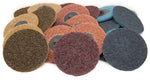
Non-Woven Surface Conditioning Discs
Surface conditioning discs blend grind marks and remove heat tint without changing part geometry. They leave a uniform satin finish that prepares metal for paint or polishing. For in-depth application guidance, read about surface conditioning techniques in metal fabrication.
Unitized Deburring Wheels
Unitized wheels compress non-woven fibers into dense discs for edge deburring and hole cleaning. They maintain shape under pressure and prevent gouging on machined parts.
Felt Polishing Discs
The felt polishing discs in this collection use the same Type R mount as our coated and non-woven quick change discs. Used with paste compounds, they produce a mirror shine on small parts.
Matching disc diameter and tool speed to your backing pad is the next step for safe, efficient operation.
Get the Right Size for Your Tool
Size, Tool, and Operating Speed
Disc diameter sets your surface coverage and tool clearance. It doesn't set the speed limit. The lowest-rated part of the setup does. Running above that rating builds heat that can soften plastic hubs or throw a disc from its holder. For more on speed matching, read our guide on understanding RPM ratings on abrasive tools.
Benchmark stocks quick change discs and matching mandrels in 2-inch and 3-inch diameters.
- 2 Inch: Die grinders working in tight channels, inside corners and porting. Max rated speed: 25,000 RPM.
- 3 Inch: Right-angle die grinders and surface-prep tools on open weld seams, where the bigger disc is more stable. Max rated speed: 25,000 RPM.
Always check the max operating speed marked on the disc, the holder and the tool. Your tool's free-run RPM must never be higher than the lowest-rated part in the setup.
Holders, Mandrels, and Backing Pad Maintenance
A backing pad functions as part of the abrasive system, directly affecting cut stability, edge wear, and lock security. Pad density dictates surface contact. Firm pads maximize stock removal on flat welds, while medium and soft pads flex along curves to prevent gouging.
A secure fit needs three matches: the attachment type, the diameter and the tool connection. A Type R disc won't lock into a Type S holder, and a 2-inch disc needs a 2-inch holder. Our 2-inch and 3-inch mandrels fit every Benchmark quick change disc of the same size. Review our guide to backing pad accessories for compatible replacement options.
Most disc slippage, vibration, and detachment trace back to worn holder pads rather than defective abrasives. Frictional heat, overtightening, and constant disc swaps wear down threads and distort the rubber backing. Inspect your holder and replace it if you observe:
- Discs slipping or backing off under load
- Disc hubs failing to seat fully against the pad
- Melted, warped, or torn rubber mounting surfaces
- Excessive vibration or wobble at operating speed
Using worn holders damages abrasives and ruins surface finishes. Shop fresh pads and discs together to keep your quick change disc system performing correctly.
Frequently Asked Questions About Quick Change Discs
What is a quick change disc?
A quick change disc is an abrasive disc with an integrated mechanical fastener that twists into a rubber backing pad without hand tools. These discs mount on die grinders, rotary tools, and compact pneumatic sanders for weld blending, deburring, and surface preparation in tight spaces. Fabricators rely on them for multi-step finishing workflows because operators can swap between aggressive grinding grains, non-woven conditioning pads, and polishing discs in seconds.
What is the difference between Type R, Type S, and TR quick change discs?
Type R and TR are the same system. TR, Type III, Roloc™, roll-on, quick-lock and twist-lock are all names for the Type R attachment, which uses a threaded plastic button. Type S (Type II) uses a different threading system from Standard Abrasives and won't fit Type R holders. A third system, Type P (Type I), is no longer made. Benchmark sells Type R only, so every disc we carry fits any Roloc™, Type R or Type III holder of the same diameter.
What backing pad do I need for quick change discs?
Use a Type R holder that matches your disc diameter. Benchmark's 2-inch and 3-inch quick change mandrels have a 1/4-inch shank for standard collet die grinders. They also accept other brands' Roloc™, Type R and Type III discs. If discs slip, wobble or detach during use, replace the holder right away.
What size quick change disc should I run on a die grinder?
Benchmark stocks 2-inch and 3-inch quick change discs. Use 2-inch discs in narrow channels, ports and inside corners. Use 3-inch discs when you need more stability on flat weld seams. Both are rated to a max of 25,000 RPM. Make sure your grinder's free-run speed and your holder's rating don't exceed that.
Can you use felt polishing discs on a quick change holder?
Yes, provided the felt disc is built with the matching quick-change fastener for your backing pad. Quick change refers to the mechanical twist-on mounting system, while felt is a distinct material category for final compound buffing. Pair your felt discs with compounds from our buffing products catalog for mirror finishes.
Explore the full selection of quick change discs across grits, sizes, and mounting types in the collection. Our surface conditioning collection also covers detailed grade and color specifications for non-woven abrasives.
Join Our Newsletter
Sign up to get the latest on sales, new releases and more …Join Our Newsletter
Sign up to get the latest on sales, new releases and more …Shop Categories
Recent Articles
- Felt Polishing Discs, Flap Discs & Flap Wheels
- How to Polish a Weld to a Mirror Finish
- How to Polish Cast Aluminum
- Luke Hummer - Erie County Community College
- Industrial Quick Change Discs for Fast-Lock Grinding and Finishing
- Felt Polishing Wheels, Bobs & Discs: Guide to Detail Work
- Matthew Cartwright
- Jacob Martinez (Foxholes to Fabworks)
- The Gathering
- David Fisher (Fisher Forge)
Featured Products
-
 746 Reviews
4-1/2" x 7/8" T29 Zirconia High Density Flap Disc - 10 pack
$25.19
-
 738 Reviews
4-1/2" x .040" x 7/8" t1 premium thin cut-off wheel - 25 pack
$20.88
-
 220 Reviews
4-1/2" x 7/8" T27 Zirconia High Density Flap Disc - 10 pack
$25.19
-
 380 Reviews
6" x .045 x 7/8" T1 Premium Thin Cut-Off Wheel - 25 pack
$27.29
-
 55 Reviews
Nonwoven 6" X 9" Scuff, Clean & Finish Hand Pads
$0.83
-
 123 Reviews
4-1/2" x 1/4" x 7/8" T27 Depressed Center Grinding Wheel - 25 pack
$28.34


Blog Categories
- Abrasives
- Sanding
- Grinding Deburring Finishing
- Safety and Cleanliness
- Metal Working
- Selecting Tools And Equipment
- Wood Working
- Art And Design
- Diy Projects
- Industry 4.0
- Buffing
- Cutting Tools
- Carbide Burrs
- PPE
- Wire Brushes
- Bonded Abrasives
- TIG Electrodes
- Wire Wheels
- Bits
- Diamond Blades
- Power Brushes
- Product Reviews
- Grinding
- Finishing
- Industrial Cleaners